 Sound Safari
SOAP notes that write themselves.
The only articulation app with auto-generated SOAP notes — every section filled from the speech therapy session you just ran. Pick a template, or draft with on-device AI.
 14-day free trial · Cancel anytime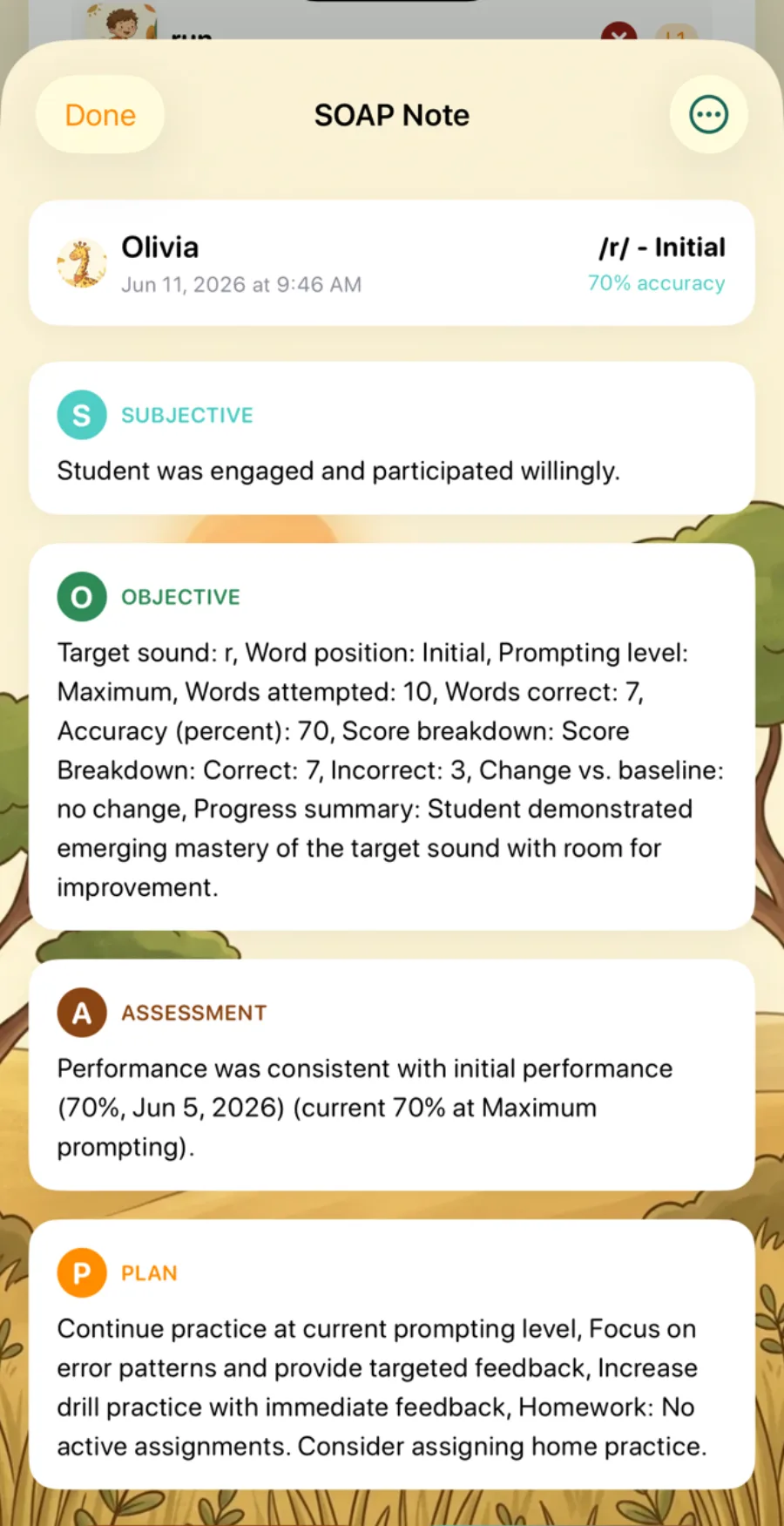
The problem
Every SOAP note starts with numbers you already have — accuracy, prompting level, trial counts — sitting in the session you just scored. Writing it by hand means retyping tracked data, which is why speech therapy documentation still feels like a second job.
The solution
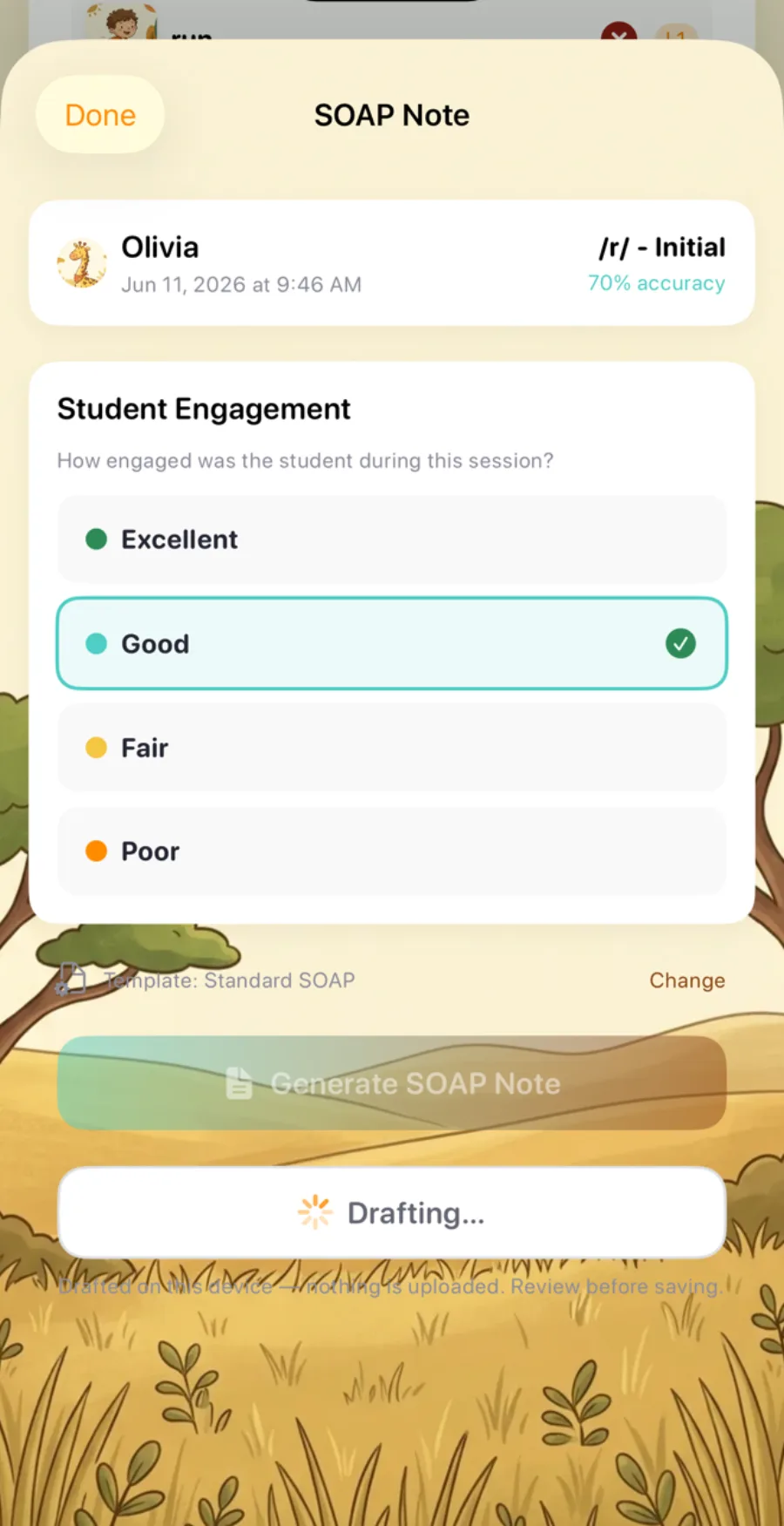
SOAP Notes turns the session you already ran into a documented note, not a new task. Rate how the student engaged, tap Generate SOAP Note (or Draft with AI on supported devices), and Sound Safari fills all four sections from real session data. It's part of Sound Safari's clinical workflow for SLPs.
Everything a SOAP note needs, generated automatically
From auto-filled objective data to on-device AI drafting — the session does the writing.
Objective data, auto-filled
Accuracy, words attempted and correct, prompting level, and the Correct/Approximate/Incorrect breakdown pull straight from the session you just scored — nothing retyped from a notepad.
Standard, Brief — or unlimited custom
Standard SOAP writes a full note; Brief SOAP condenses it to a line or two per section. Build unlimited custom templates from about 20 placeholders across six categories.
The Assessment finds its own baseline
It finds the right comparison point automatically — an active IEP goal baseline, then the most recent probe, then the first prior session on the same sound and position — never a rolling average.
An AI SOAP note generator that runs entirely on-device
On iOS 26 with an Apple Intelligence–capable device, Draft with AI writes freeform S/O/A/P prose using Apple's on-device Foundation Models — no data sent to a server. Where it isn't supported, the button simply doesn't appear and the template flow works exactly the same.
Less retyping, more therapy.
The student's name and date are excluded from the prompt by design; the model refers to the child only as "Student."
Always editable, never saved without you
Template or AI, every note lands in the same four editable fields and nothing saves until you tap Save. A generated note is a starting draft to review and edit — not a finished record until you make it one.
Built for sharing safely
Copy and Share run through a consent step with one-tap de-identify. Copied text stays on your device and clears from the clipboard after 10 minutes — and no third party ever receives your clinical or student data.
See a speech therapy SOAP note example fill itself in
Tap a sample session and watch all four sections — Subjective, Objective, Assessment, and Plan — update live, the same way the app writes them from real data.
Illustrative examples only — sample template sentences, not computed from real student data.
Student arrived engaged and participated willingly throughout the session.
Student practiced /s/ in the initial position at the word level, producing 18 of 22 words correctly (82% accuracy) with moderate prompting.
Accuracy of 82% with moderate prompting represents progress from the active IEP goal baseline of 60%, with a reduction in prompting support from the previous session.
Continue /s/ initial at the word level; fade to minimal prompting as accuracy holds above 80%.
How SOAP note generation works
-
Run a practice session
Sound Safari captures accuracy, prompting level, and trial data automatically as you score.
-
Rate engagement
From the results screen, rate the student — Excellent, Good, Fair, or Poor — to feed the Subjective section.
-
Generate the note
Tap Generate SOAP Note to fill a template, or Draft with AI on supported devices — then review, edit, and save.
-
Save and revisit anytime
Notes save to the student's profile, browsable with a time-range filter and ready to copy or share behind a consent step.
Why SLPs choose it over hand-written notes and EHR templates
Unlike writing notes by hand or a generic EHR template with no link to your data, SOAP Notes lives in the same app where the session happened.
| Capability | Sound Safari SOAP Notes | Writing notes by hand | Generic note-taking / EHR templates |
|---|---|---|---|
| Pulls data from your actual session | Yes — accuracy, prompting, and score breakdown auto-fill | No — retyped from memory or scratch notes | No |
| SOAP-formatted templates | Standard, Brief, or unlimited custom | Formatted from scratch each time | Sometimes, but not from your session data |
| Clinical reasoning in Assessment | Automatic tiered baseline comparison | Manual — you find the comparison point | No |
| On-device AI drafting | Yes, on supported devices — nothing leaves the device | No | Rare, and typically cloud-based |
| Lives in the same app as your sessions | Yes | No | No |
Smarty Ears Online is the closest competitor with AI-assisted reporting — but it isn't SOAP-formatted. See the full breakdown: Sound Safari vs. Smarty Ears →
Frequently asked questions
What is a SOAP note in speech therapy?
A SOAP note is a session record with four sections — Subjective (engagement and observations), Objective (measured data like accuracy and prompting level), Assessment (progress compared to a baseline), and Plan (next steps). SLPs write one after each therapy session; Sound Safari generates the draft automatically from scored session data.
What is SOAP Notes in Sound Safari?
A Pro feature that auto-fills a Subjective/Objective/Assessment/Plan note from a scored practice session. Pick a template — or draft with on-device AI on supported devices — then review, edit, and save.
Do I need a Pro subscription to use SOAP Notes?
Yes — SOAP Notes is part of the Pro plan, built for the clinical documentation SLPs need. It isn't included in the Parent plan. Every plan starts with a 14-day free trial. See Pro plans.
Can I export a SOAP note as a PDF?
Not today — SOAP notes export as formatted plain text via Copy or Share, built for pasting into your practice's own EHR or documentation system. (PDF export exists separately, for Progress Reports and Screening Reports.)
Is Sound Safari HIPAA compliant?
No — Sound Safari is not HIPAA compliant and doesn't offer a Business Associate Agreement. A built-in de-identify option swaps a student's name for initials before you copy or share a note outside the clinical record.
Does Draft with AI work on every device?
No — Draft with AI requires iOS 26 and an Apple Intelligence–capable device. On devices without it the button simply doesn't appear, and the standard Generate SOAP Note template flow works exactly the same.
Explore the full clinical workflow
SOAP Notes is one piece of Sound Safari Pro — screen, document, and track goals in the same app. Your next session can write its own note.
Articulation Screener
A built-in 24-sound screen with developmental norms and a PDF report — no separate assessment app.
See the screenerIEP Goals
A goal bank across 8 categories with baselines from your probe data and charts that update automatically.
See IEP goalsThe whole toolkit
Probes, error-pattern detection, group sessions, progress reports, and unlimited students in Sound Safari Pro.
For professionalsTry Sound Safari free for 14 days
Tap on iPhone or iPad