 Sound Safari
A full articulation screener, already built in.
No second assessment app: developmental norms, automatic error-pattern detection, and results that carry straight into a SOAP note or IEP goal.
 14-day free trial · Cancel anytime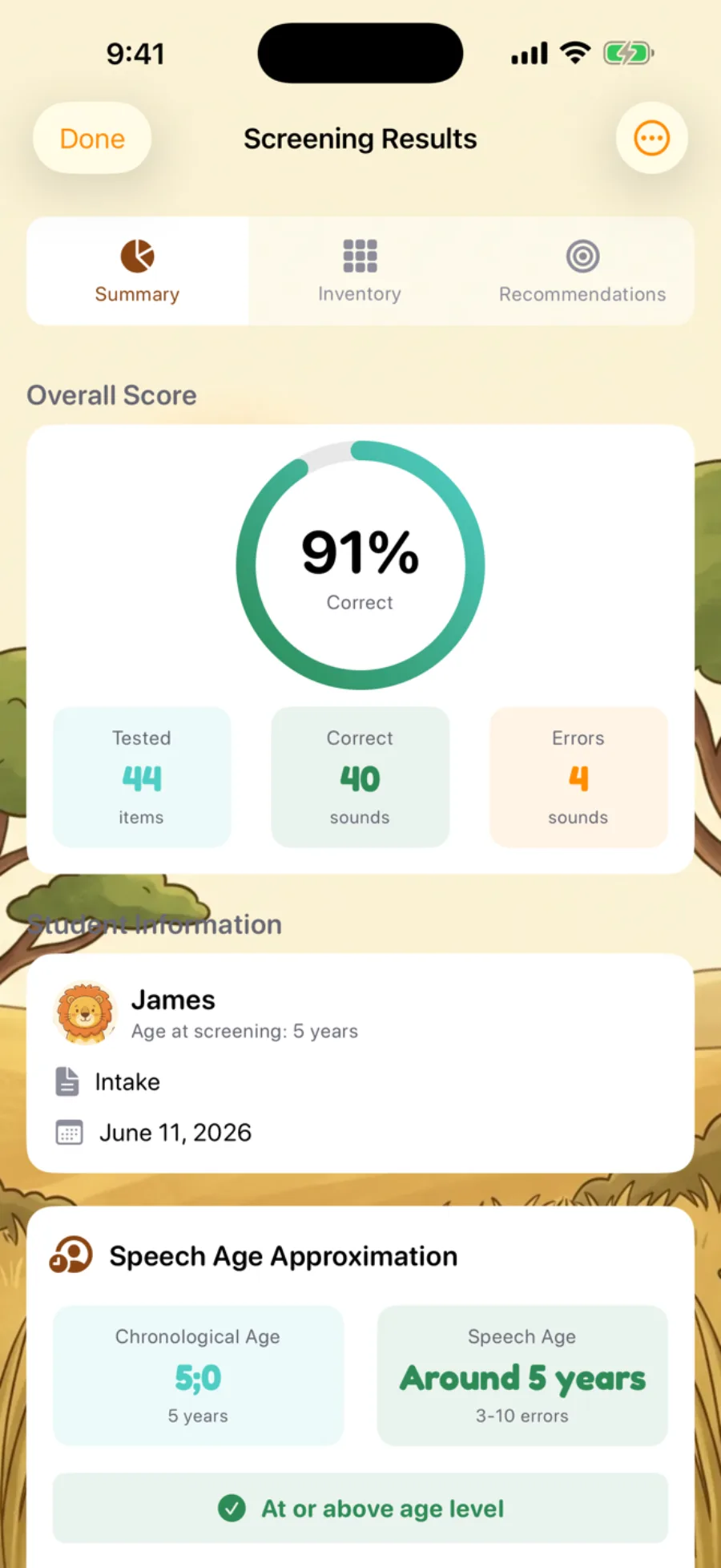
The problem
Most articulation screening still means a second app — a separate paid articulation screening app or a home-grown checklist with no developmental-norm context. Either way, the results live outside the tool you actually practice and document in, so findings get re-typed by hand into a report, a SOAP note, or an IEP goal.
The solution
Sound Safari's articulation screener is built into the same Sound Safari Pro plan you already practice, document, and track progress in — no separate purchase, no exporting between apps. Error patterns and developmental-norm context surface on the spot, and the result carries straight into a therapy plan, a SOAP note, or an IEP goal.
Everything a complete articulation screening needs
Built from the same data you already collect while scoring — read back as clinical insight, not just a tally.
See the pattern, not just the tally
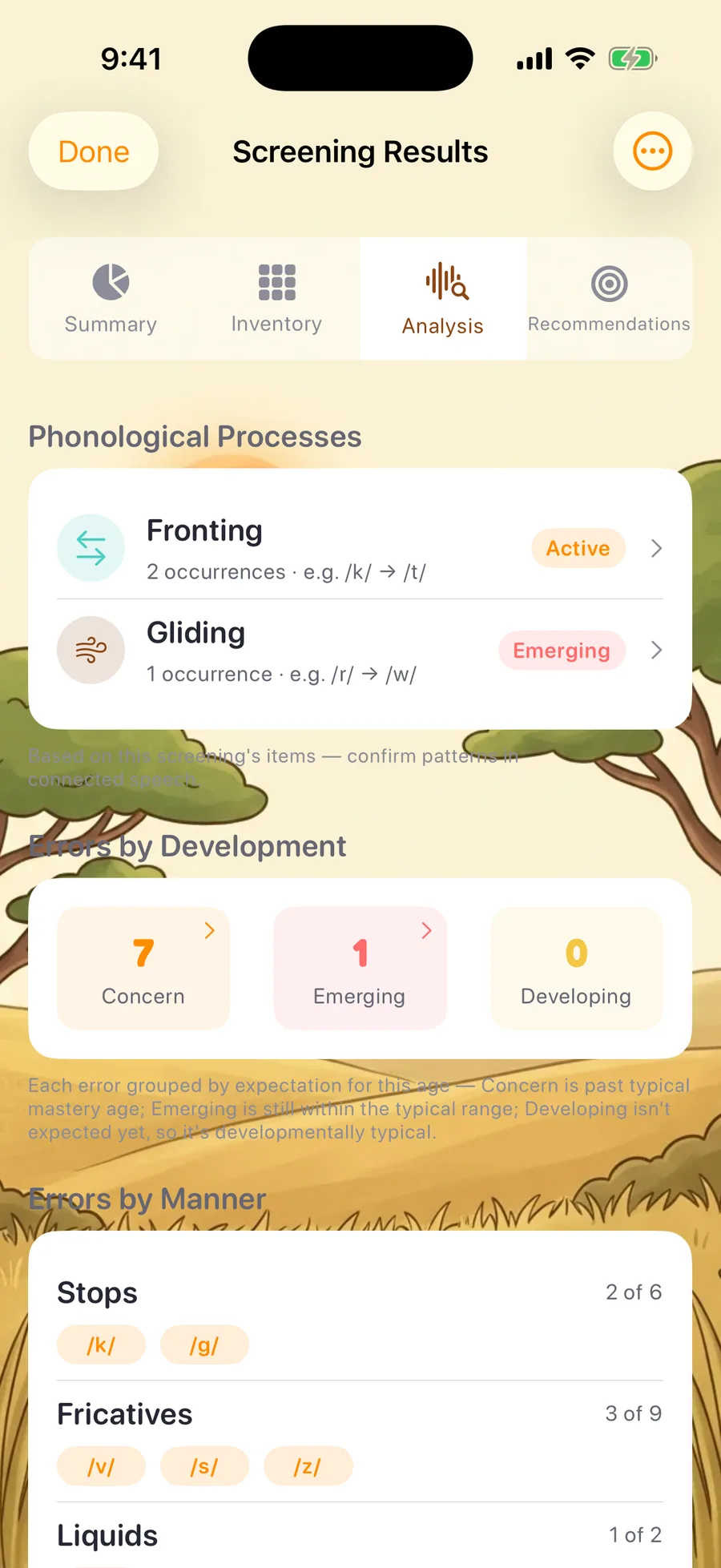
Sound Safari auto-groups substitution and omission errors into recognized phonological processes (a k→t error is labeled Fronting) and flags atypical patterns like Backing separately. Each error is classified against developmental norms into Concern, Emerging, and Developing tiers.
Errors grouped the way SLPs think
Two Analysis-tab sections organize a screening's errored sounds — Stops, Fricatives, Liquids by manner; Bilabial through Glottal by place — each with a fraction like "Fricatives: 5 of 9 in error" and IPA chips. Sections only appear with two or more errored sounds, so a single error is never dressed up as a trend.
Catch what two positions miss
Sound Safari tests nearly every consonant speech sound in Initial, Medial, and Final position in one pass, with 24 dedicated medial stimulus words (a few sounds — /h/, /w/, /y/, /ŋ/ — don't occur in every position). A medial-only error no longer slips through as a false "Correct."
Stimulability, the moment it matters
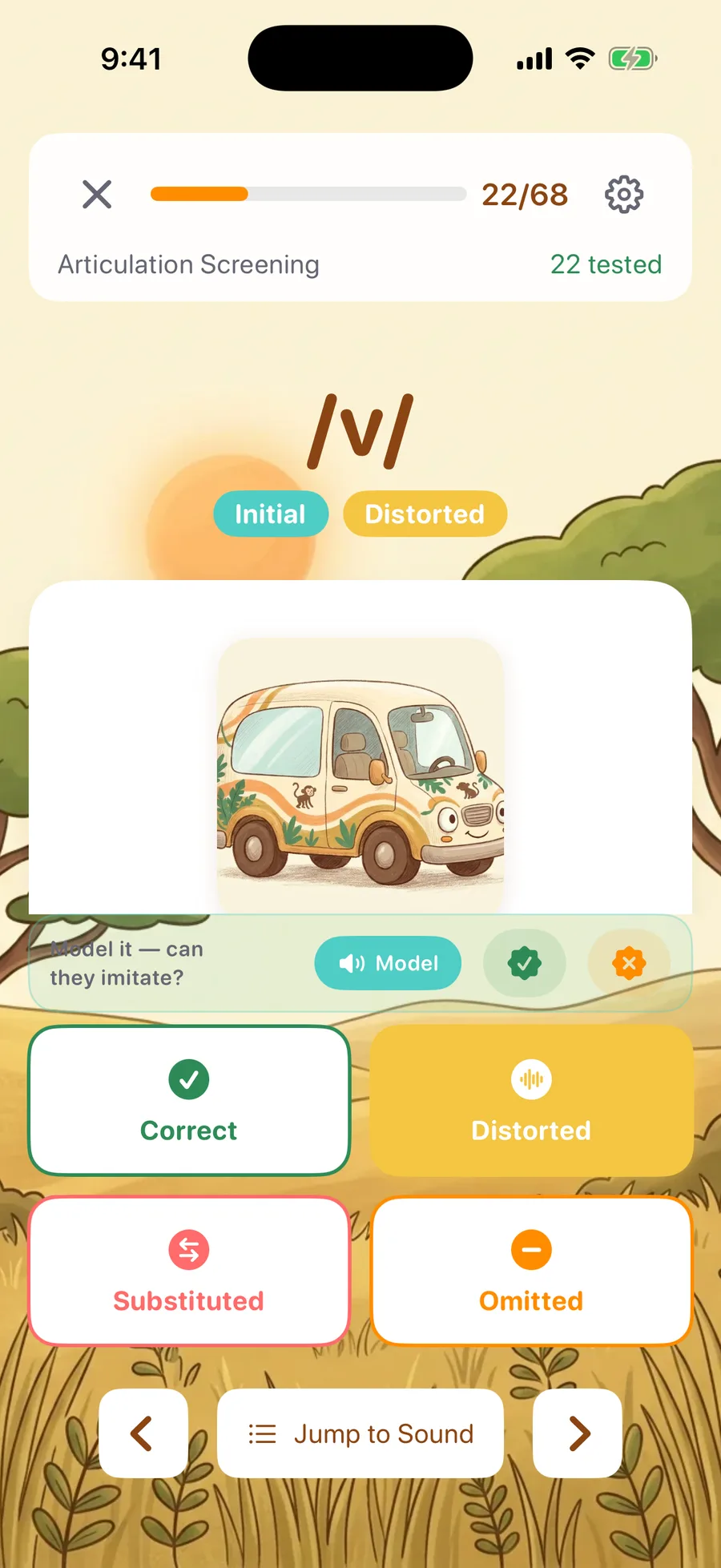
Mark an error and an inline probe appears right above the scoring buttons: an optional recorded model of the exact stimulus word, plus a Stimulable / Not Stimulable mark.
Double-check every call
Record a child's production on any item and play it back on the spot, before moving on.
Score four real screening items
Score four items the way Sound Safari presents them — including two medial-position sounds most two-position screeners skip — then see how the errors roll up in the Analysis tab. Mark an error and the stimulability probe appears, exactly as it does in a real session.
A live preview of real screening items — not a diagnostic tool. Nothing you score here is saved, analyzed, or compared to norms.
Tune the screening to the child — and the district
Two switches most screeners don't have — both live, both reversible after scoring.
Screen only what's developmentally relevant
Age-Appropriate mode narrows the screen automatically to the sounds that match a child's age, with Full (all 24) and Custom (a hand-picked subset) available anytime. Every result states how many of the 24 sounds were covered.
Matched to the child's age — the youngest children screen as few as 7 of the 24 sounds.
Score against the norm set your district uses
Choose Crowe & McLeod (2020) or the Iowa-Nebraska Articulation Norms (Smit et al., 1990), and switch the applied norm set from the results screen anytime — even after scoring. Every export carries a full citation.
Crowe, K., & McLeod, S. (2020). American Journal of Speech-Language Pathology, 29(4).
From screening to therapy plan, without the blank page
A finished screening already holds everything a report needs. On devices with Apple Intelligence, Sound Safari turns it into three editable drafts in seconds — then hands them straight back to you to review.
The AI drafts from the screening's own prioritized recommendations — it never re-ranks them or second-guesses your clinical calls, and nothing leaves the phone. Requires iOS 26 and an Apple Intelligence–supported device.
14-day free trial · Cancel anytime How the articulation screening works
-
Pick a student and set coverage. Choose Age-Appropriate (the default), Full, or Custom sounds, across Initial, Medial, and Final positions.
-
Score live. Mark each response Correct, Distorted, Substituted, or Omitted; when an error comes up, play the model and mark stimulability right in the moment.
-
Review the Analysis tab. Phonological processes, errors by manner and place, developmental-tier breakdown, and an intelligibility rating — all from the same session.
-
Draft and document. On supported devices, generate an editable report or therapy plan; on any device, export the structured Analysis, or carry findings into your SOAP notes or IEP goals.
Sound Safari vs. standalone articulation screening apps
One subscription — not a second paid assessment app, and not a consumer speech app with no clinical screening at all.
| Capability | Sound Safari's built-in screener | Standalone paid assessment app | Typical consumer speech app |
|---|---|---|---|
| Cost | Included in your existing Sound Safari plan | Separate purchase required | Often free, but no clinical screening |
| Sound & position coverage | Up to 24 consonants, Initial/Medial/Final, age-adaptive or full | Varies by tool | — |
| Developmental norms | Crowe & McLeod (2020) or Iowa-Nebraska (Smit et al., 1990), selectable | Varies by tool | — |
| Error-pattern detection | Automatic phonological-process detection with Atypical flags | Typically manual review | — |
| Documentation | PDF/text export, plus SOAP notes and IEP goals in the same app | Separate export, no link to documentation | — |
The screener is included in every Pro plan — start your 14-day free trial
Full side-by-side breakdowns: Sound Safari vs. Articulation Station, vs. Speech Blubs.
Frequently asked questions
Is the Sound Safari articulation screener a diagnostic test?
No — it's a screening tool, not a medical device, so it flags patterns and priorities for you to interpret rather than diagnosing. Clinical decisions and eligibility for services still require a comprehensive evaluation under your state or district's criteria.
How many sounds does the screener cover, and in what positions?
The full inventory is 24 consonant sounds, nearly all testable in Initial, Medial, and Final word position (/h/, /w/, /y/, and /ŋ/ don't occur in every position in English). Screen all of them in Full mode, let the app narrow to what's age-appropriate (the default), or hand-pick a Custom subset.
What developmental norms does the screener use?
Crowe & McLeod (2020) is the default; you can also apply the Iowa-Nebraska Articulation Norms (Smit et al., 1990) and switch between them from the results screen without re-testing the child. Every exported report includes the full citation for whichever norm set was applied.
Does the app use AI to write my reports?
Yes — on devices with Apple Intelligence (iOS 26 and later), Sound Safari drafts an editable narrative report, a therapy-plan draft, and a plain-language parent or teacher summary, all generated on-device and reviewed by you. Devices without Apple Intelligence still export the full structured Analysis section.
Is my student data private — and is Sound Safari HIPAA compliant?
Yes — no third party ever receives your clinical or student data, and there are no ads, behavioral tracking, or data brokers. One caveat: Sound Safari is not HIPAA compliant and doesn't offer a Business Associate Agreement, so we recommend using student initials rather than full names.
How long does an articulation screening take?
A full 24-sound screening typically takes about 12–16 minutes, and Age-Appropriate mode shortens it for younger children — the youngest screen as few as 7 sounds. Scoring happens live as the child responds, so the Analysis tab and report are ready the moment you finish.
Where your findings go next
A completed screening flows straight into the rest of your documentation — no re-typing.
SOAP notes
Auto-generated from the session you just ran, editable before you export a PDF.
Explore SOAP notesIEP goals
Turn a flagged sound into a SMART goal that tracks itself from your sessions and probes.
Explore IEP goalsSound Safari is a screening and clinical-support tool — not a diagnostic or medical device.
Try Sound Safari free for 14 days
Tap on iPhone or iPad